Schema Migrations
This is the other migration — the one that keeps the database structure in step with your model. It is easy to confuse with the EO Migration (data) editor, so the one-line difference first:
| Schema Migration (this post) | EO Migration | |
|---|---|---|
| Made with | Generate Migration in the Entity Editor | the Migration Editor |
| Produces | a .java class |
an .xml file |
| Purpose | create tables, columns, foreign keys, indexes — the DB shape | create / update / delete data at boot |
When you change an entity and its hash turns orange, a schema migration is how you bring the database along.
Generate Migration
Press Generate Migration in the Entity Editor toolbar and you get this dialog:
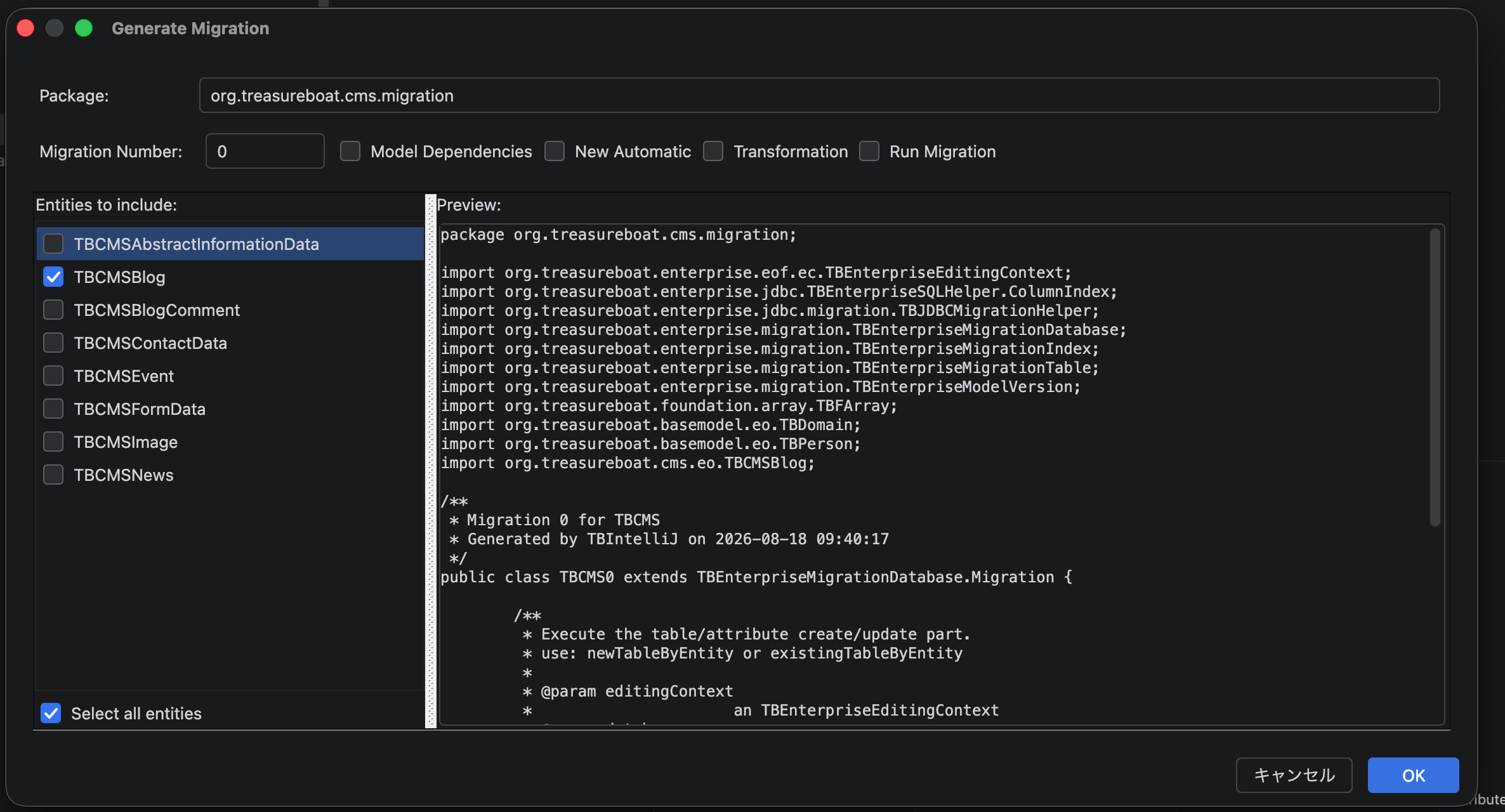
- Package – where the generated class goes (defaults to your model’s
…migrationspackage) - Migration Number – the sequence number for this migration (see Numbering below)
- Entities to include – tick the entities this migration should cover (Select all by default)
- Preview – the exact Java that will be written, updated live as you change the options
Options
- Model Dependencies – declare that this migration depends on other models’ migrations, so cross-model order is correct
- New Automatic – generate an automatic migration that derives the schema from the current model version, instead of spelling out every column
- Transformation – include a transformation hook (for reshaping data as part of the structural change)
- Run Migration – apply data sql loading to the migration that should run for data import
What gets generated
A schema migration is a real Java class — the model’s prefix and the migration
number (e.g. TBTag0) — that extends TBEnterpriseMigrationDatabase.Migration.
One migration class covers all the entities you ticked. It does its work in
three passes:
public class TBTag0 extends TBEnterpriseMigrationDatabase.Migration {

    @Override
    public void upgrade(TBEnterpriseEditingContext ec, TBEnterpriseMigrationDatabase database) {
        var table = database.newTableByEntity(TBTagStore.clazz.entity());
        table.newStringColumn("name_en", 255, NOT_NULL);
        table.newBooleanColumn("locked", NOT_NULL);
        // … one table per entity, each with its columns
    }

    @Override
    public void foreignKeyUpgrade(TBEnterpriseEditingContext ec, TBEnterpriseMigrationDatabase database) {
        var table = database.existingTableByEntity(TBTagConnection.clazz.entity());
        table.addForeignKey("idTag", TBTagStore.clazz.entity(), "id");
    }

    @Override
    public void indexUpgrade(TBEnterpriseEditingContext ec, TBEnterpriseMigrationDatabase database) {
        safeAddIndex(database, TBTagStore.clazz.entity(), _TBTagStore.NAME_EN_KEY);
    }
}
upgrade– creates the tables and their columns (newStringColumn,newIntegerColumn,newBooleanColumn, … withNOT_NULL/ALLOWS_NULL)foreignKeyUpgrade– adds the foreign keysindexUpgrade– adds the indexes (and any database-specific tuning)
Why three passes? Foreign keys are added after every table exists — you can’t point a foreign key at a table that hasn’t been created yet. So all tables and columns go in first (
upgrade), then the keys that link them (foreignKeyUpgrade), then the indexes.
Numbering
Like EO migrations, the number is a permanent, ordered history. TBTag0 is
migration 0; the next structural change to that model is a new class
TBTag1, then TBTag2, and so on. You never edit a migration that has already
run somewhere — you add the next number. The framework tracks which number a
database is on and applies only the ones it hasn’t seen.
Unlike an EO migration (an .xml file you edit in the Migration Editor), a schema
migration is plain Java — once generated you can open and hand-tune it in the
normal Java editor.
Related
- The Entity Editor — where Generate Migration lives
- The EO Migration Editor — the data migration, the other kind
- Project Layout
#IntelliJ