The API Editor
In the Project Layout post we saw a
component is a .wo folder holding .html, .wod, an optional .api, and an
optional .md. This post is about that .api file — and it’s really a
warm-up for the Component Editor, because the .api is part of a component.
An .api file declares a component’s public bindings — its interface. It
says “these are the bindings I accept, this one is required, this one expects a
boolean.” You don’t strictly need it, but when it’s there the tooling uses it:
the WOD editor offers autocomplete and validation for the component’s
bindings, and the Component Editor knows what the component expects.
What a .api file looks like
It’s a small XML file. The API Editor lets you edit it as a form so you never touch the XML by hand, but here is what it writes:
<?xml version="1.0" encoding="UTF-8"?>
<tbdefinitions>
    <tb class="MyComponent.java" tbcomponentcontent="false">
        <binding name="editingContext"/>
        <binding defaults="Boolean" name="allowHiding"/>
        <validation message="'editingContext' is a required binding.">
            <unbound name="editingContext"/>
        </validation>
    </tb>
</tbdefinitions>
<tb class="…">– the component this API belongs totbcomponentcontent– whether the component can wrap other content (like an HTML container)<binding name="…">– one per public binding;defaults="…"records its Value Set<validation>/<unbound>– how a required binding is expressed
Editor Layout
Component Content
A checkbox at the top sets tbcomponentcontent. Turn it on when the
component wraps content passed in by its parent.
Bindings List
The list of the component’s public bindings. Required bindings are shown in bold. Use Add / Remove to manage them.
Binding Details
Select a binding and the right panel shows:
| Property | Description |
|---|---|
| Name | The binding name — the same name used in the .wod to pass a value |
| Value Set | What kind of value the binding expects (drives autocomplete in the .wod) |
| Required | Whether the parent must provide it (writes the <validation>/<unbound> block) |
| Will Set | Whether the component pushes a value back to the parent (a two-way binding) |
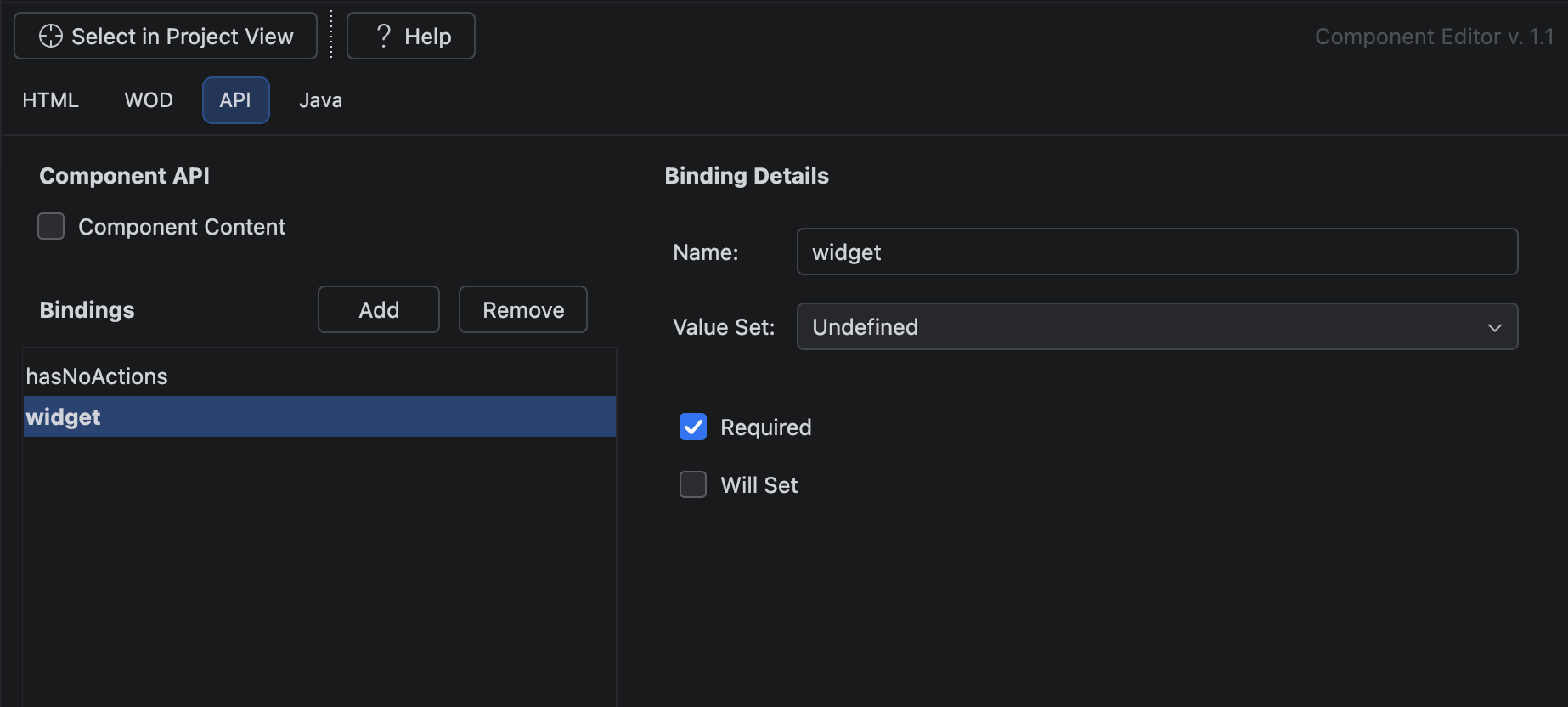
Value Set options
The Value Set tells the editor what a binding expects, so the .wod editor
can autocomplete it:
| Value Set | Expects |
|---|---|
| Undefined | anything |
| Boolean Set | true / false |
| Actions | a method returning a page or action result |
| Pages | a TBComponent page name |
| Frameworks | a framework bundle name |
| Date Format Strings | date patterns |
| Number Format Strings | number patterns |
| MIME Types | MIME type values |
Good to know
- The
.apiis optional — a component works without one. You add it to give the component a declared, autocompleting, validated interface. Recommended for anything reused by other components. - Required is not an attribute on the binding — it’s a separate
<validation>block with an<unbound>entry. That’s what turns the binding bold in the list and what warns you in the.wodwhen it’s missing. - Match binding names to the component’s Java accessor methods — it keeps the
.html,.wod,.apiand.javaall speaking the same names.
Related
- The Component Editor — the
.wobundle the.apibelongs to (next post) - Project Layout — the
.woanatomy
#IntelliJ